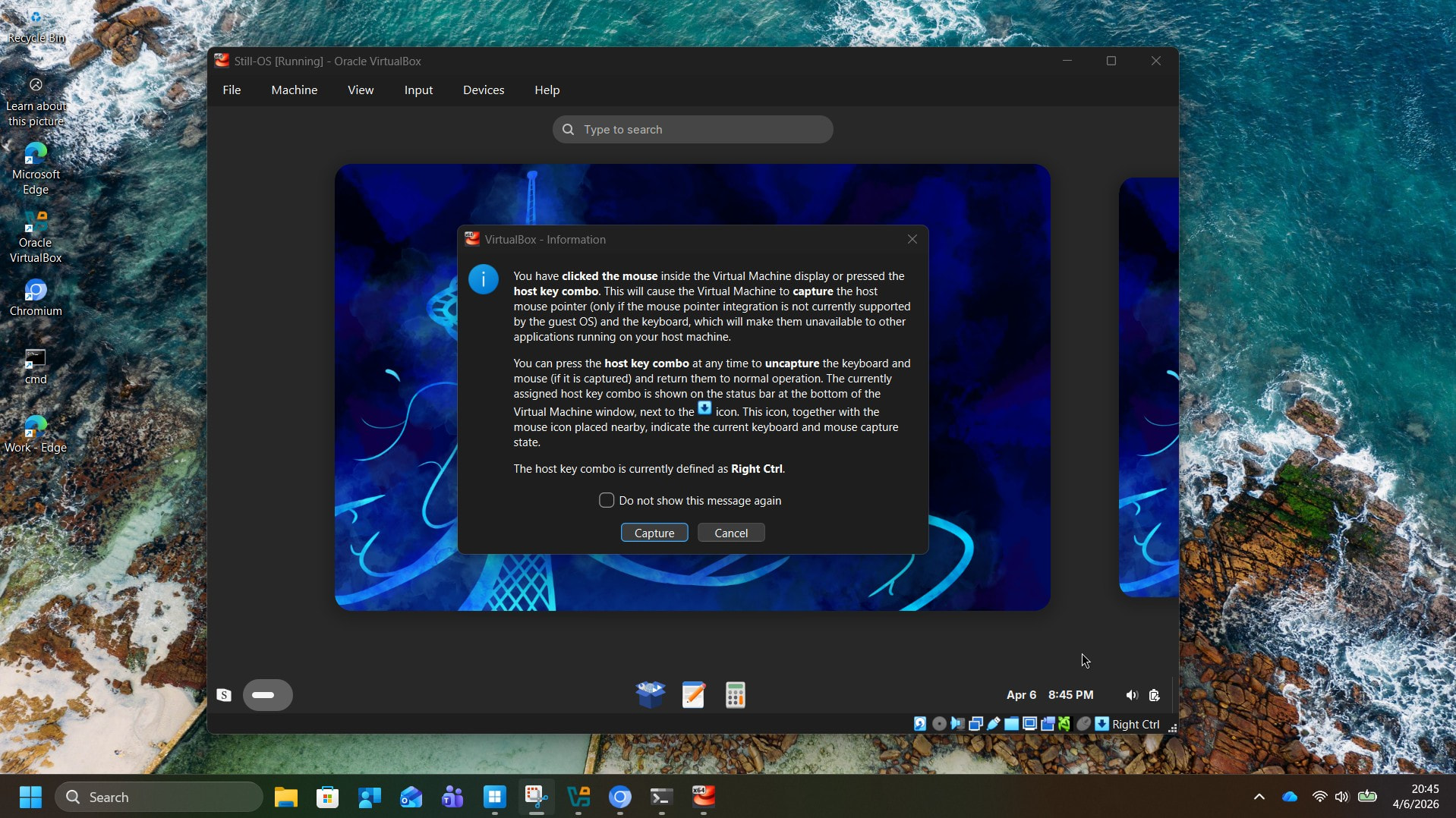
I saw a post on reddit about this new Still OS, thought I’d give it a try. I installed it first in Oracle Virtual Box to see how it feels. Within the virtual box, it did not let me to use the keyboard to choose between the selections during installer, I had to use the mouse. When I did click the mouse to continue with the installation, it did warn me that my mouse pointer will be “captured” by the guest session, I said yes. Then I proceeded with the installation, found that I could not move my mouse pointer out of the Oracle Virtual Box at all while the installation was proceeding. Had to wait until the installation is completed, then choose “Reboot”.
When I logged back into Still OS using the username and password I chose, I could not locate the Start menu. My display is set to 1920 * 1080 pixels, with this setting within Oracle Virtual Box the start menu is slightly below the visible panel with a scroll bar to the right. With other Linux installations that I usually try this scroll bar is selectable by the mouse, dragged down to see the taskbar at the bottom, but not here. Still the same issue of not being able to drag the mouse pointer outside of the Still OS window.
To get out of this, I right click on the desktop, set the resolution to something smaller (in this case 1200 * 800 pixels) that shrunk the window, located the “S” start menu, and shut down.
The virtual box hardware settings were: 8 GB RAM with 50 GB disk space, 3D acceleration enabled with 256 MB Video RAM, 2 CPU.
I made an account on this forum to provide this feedback / bug report.
Edited to add: Oh, I also forgot to add about the password requirements of minimum 10 characters. I found that a bit annoying, I wanted to set a password that’s only 8 characters long. This password is supposed to be for a local account, why should it need to be secure?
The default panel autohides out of the box. It’s my preferred default, but it will be changed stillOS 10.2 because people do not like that default.
The password character thing is a GNOME thing, not stillOS, although I believe it just says it’s a bad password and lets you bypass it, as when I am testing a stillOS image in Virtualbox, I always just put “password” and it works fine other than getting a warning it’s a terrible password.
Appreciate the quick response to my post. I just wanted to also mention here that, when the installation completed, and tried to log back in, it presented to me the username I picked for login, but no box to enter the password. Well, because I could not use keyboard, I *HAD* to click the mouse on the username, which the Virtual Box warned that my mouse pointer would be captured by the guest session. This is the part that’s annoying, as there is no place to enter the password without surrendering control of the mouse to the guest session – which in turn means that I cannot switch to any other window on my host computer unless I shut down the Still-OS session in the virtual box. The password issue is much less important than having this mouse-capture issue resolved.
EDITED by admin because the post was inside a 1 line code-block making it hard to read.
If I say yes, I cannot move the mouse off this rectangle. I cannot smoothly move the mouse beyond the rectangle of Oracle virtual box into my host desktop area.
If you need any logs etc. I am happy to provide. I am not a proficient Linux user; I am exactly your target audience of a reasonably computer literate Win-11 user trying to switch over to Linux but who does not know first thing about Linux. Except, perhaps, to move mouse around the GUI to get to what I want.
If you need me to gather logs, configuration files, etc. I am happy to do so.
I understand that one has to surrender the mouse control to Virtual Box, but with Still-OS virtual machine I cannot grab the mouse outside of the box. With other Linux virtual machines I have been testing (I have MX-Linux and Q4OS virtual machines), I can drag the mouse beyond the vbox borders back to my desktop.
The implication is that I cannot be looking at the Still-OS VM for some time, switch to host desktop for other work, come back to Still-OS, etc. If I am in Still-OS VM, I will have shut down the machine to return to host desktop. That sounds to me like a big impediment to effective user acceptance testing of your product; I am aware most Linux testing takes place within VMs.
stillOS isn’t doing anything different that would directly cause that, so this could be a Wayland or GNOME issue, and in that case, there’s nothing I can do.
stillOS is an operating system targeting desktop hardware, not VMs. You can still use stillOS in a VM for testing, but it is not a supported use case.
It may be a Gnome or Wayland issue, but I also did test Zorin OS in the past (deleted the VM after concluding that it’s not my Linux home), which uses Gnome and don’t recall encountering this issue. Just suggesting you may want to see what Zorin OS coded differently than Still OS did.
MX-Linux edition that I tested is both Wayland and Gnome free (it’s XFCE), so I am not even sure that this is a Wayland/Gnome issue.
I beg to differ that it is not a valid use case; expecting that a tester will have to shut down the VM and fire it back up whenever testing any aspect of the OS with no access to the host system is a bit too much to ask. I think any user trying to switch to Linux will follow the same path as me – try a distro in a VM first, see if it appeals, then switch if it does. Minor irritants like these make it less likely that the distro will be chosen. Just my two cents.
I never said it isn’t a valid use case; it’s just not supported for a variety of reasons. It’s very difficult for us to install VirtualBox Guest Additions on a read-only file system, which would break many features, and Wayland is notorious for not working well in VirtualBox. Maybe try VM-Ware for Windows hosts but it’s untested because I do not have any Windows systems. The best experience is KVM (Virt-Manager/GNOME Boxes), but that only works on Linux hosts.
I ran into issues like this with VMWare VM on windows. There is a key-combination to get the mouse back. I found this:
Hope that helps.
I had tested many (mutable only) distros in VM, and they seem to have some different behavior in how easily they “trap” the mouse. The VM itself may also matter.
Ultimately you have to test a distro on bare metal. Then you know it works with your hardware. I had odd issues with scale etc. in VM, that didn’t appear on bare metal. I’m a noob, but a VM basically creates a GENERIC simulation of a PC, and not the one you have.
Thank you so much! Your reply does remove the irritant that I had, with the right CTRL button on my keyboard I can cede control of my mouse to within the VM and gain it back on the host computer again. Thank you VERY MUCH indeed, didn’t know this trick.
Hi Cameron,
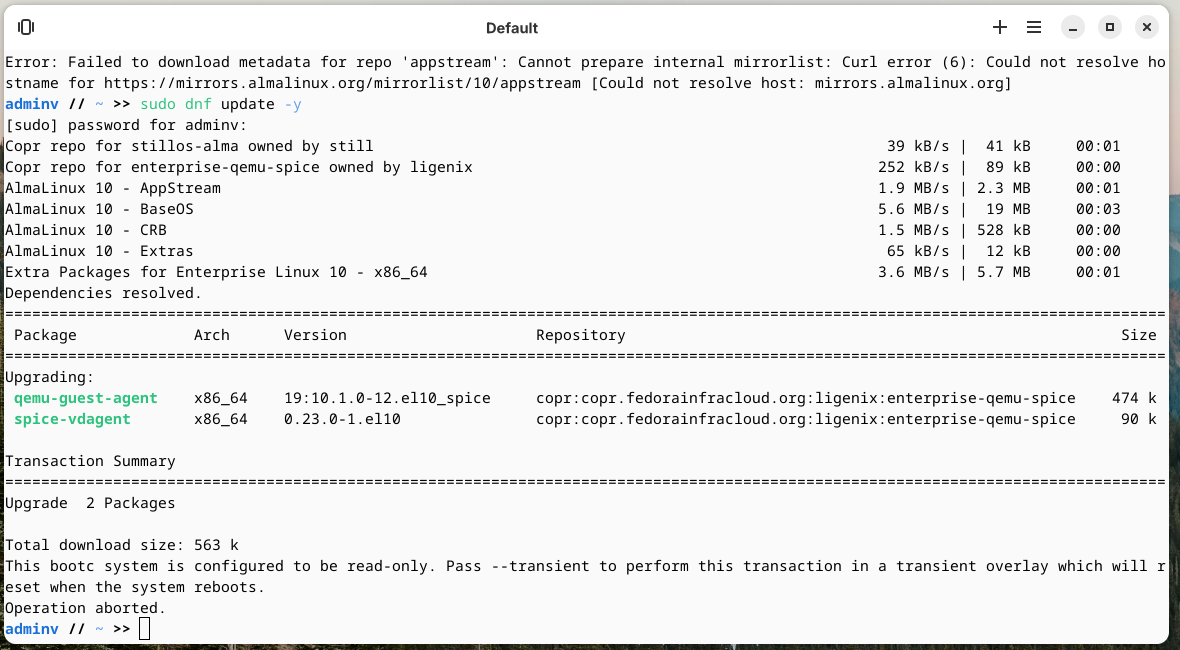
Next up question. When I tried to see if there are any newer updates for the installed software, I am getting errors. Is this something to do with Still-OS being an immutable distro?
The intent is to install other applications on the OS, in my particular case WINE and Waterfox browser. stillCenter is not bringing up any software repositories to choose from, the command line attempt is throwing the above errors.
Additional feedback: Looks like the Ethernet connection in virtual box is not persistent. Once I logout and log back in, I had to explicitly toggle the Network Connection to ON
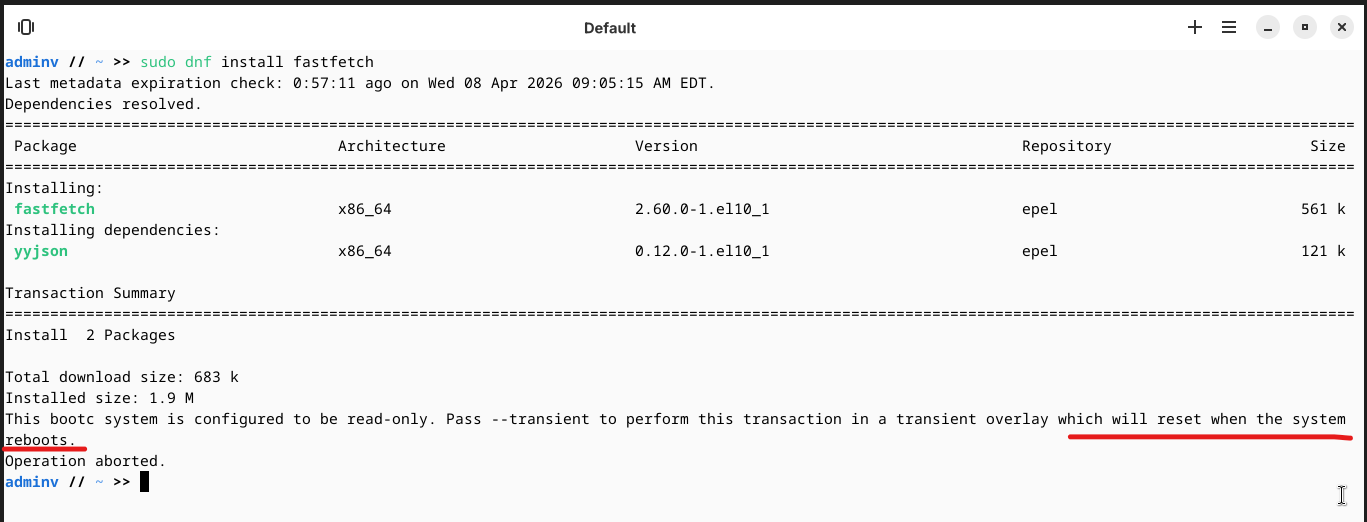
Any packages or applications that are not present already and I have to install, looks like they will be wiped out at next reboot:
Hello, stillOS is a read-only filesystem and the OS is distributed as a complete image rather than just a collection of pre-installed packages. This helps prevent any update reliability issues or conflicts.
For app installation, you can either use stillCenter (which is having more and more apps added each week), or use Flatpak. For CLI you can setup homebrew (which will also be preinstalled in a future update). For anything else, you can make a container for another distro in stillTerminal, use that distro’s package manager, and than use “distrobox-export” to integrate it into the main system.
For standard system updates, the system will automatically update either 15 minutes after boot, or every 24 hours after the first 15 minutes if you leave your computer on.
If you need to trigger an update manually, use ‘sudo bootc upgrade’.
I cannot remember if I already added Waterfox to stillCenter, but you can install that from the command given on the Flathub website if it isn’t. For Wine, check out the program “Bottles” available in stillCenter.
I’m not sure why the Ethernet is messed up, I will see if there’s anything I can do to the image to fix it. That’s another advantage of the image based approach is if there’s some sort of manual fix people need to do to get something working, I can apply to the fix to the image and get it working for everyone.
Installed StillOS on an HP EliteBook 840 G6 today. 32GBs of RAM, 500GB SSD, Core i7 8th gen with Intel integrated graphics. Used Ventoy for the install. Worked just fine. A little rocky here and there, as described by others, but overall workable in this early beta state.
As for the desktop experience, quite nice. There are a number of duplicate settings here and there, something I’ll have to spend a little time documenting, but everything seems to work reasonably well.
I look forward to seeing this project grow and improve over time. Thanks for the hard work!
Thank you for the feedback, when you have a chance, documenting duplicate settings would be helpful for us. The only one I know of is the light/dark switching in stillControl so far, but that is intentionally because it allows you to enable the experimental light mode (that we are fixing in the next update).
VMWare works but StillCenter and StillControl don’t work. Have default GNOME settings on onehand but GNOME Software is no longer present. StillControl doesn’t launch and StillCenter can’t populate app repository data.